Talk - AI Chatbot Mobile App: Your Digital Confidante
Imagine having a thoughtful, always-available friend in your pocket—one who listens without judgment, responds with genuine insight, and adapts to your mood. That's the experience the Talk - AI Chatbot Mobile App is designed to deliver. This isn't another sterile chatbot interface that feels like talking to a spreadsheet. Talk creates the feeling of settling into a cozy corner booth at your favorite café, where you can unload your thoughts, wrestle with dilemmas, or simply muse about life's oddities. From late-night brainstorming sessions to quick lunchtime debates, this AI companion is built to engage meaningfully with whatever's on your mind.
A Design That Feels Like a Conversation
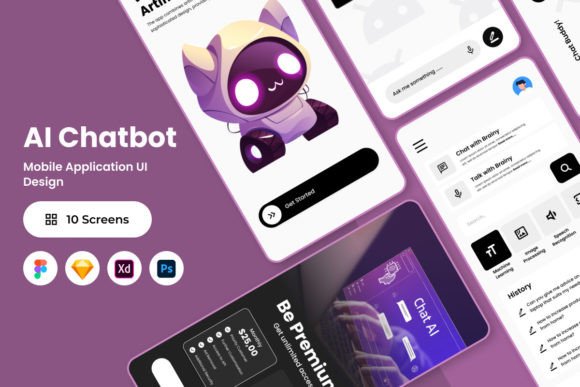
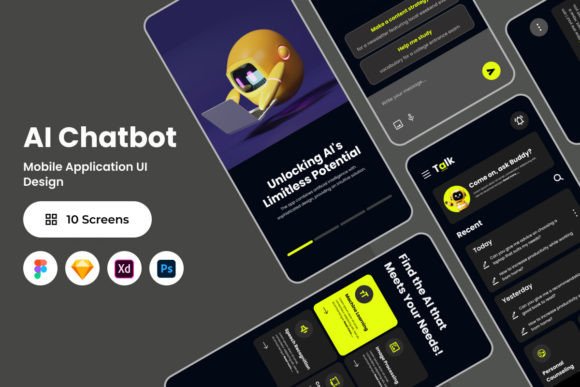
The visual character of Talk is central to its appeal. The screen layout design prioritizes clarity and warmth, using a clean typographic hierarchy that guides your eye naturally through the conversation. Messages from the AI and your own inputs are clearly distinguished, yet the overall aesthetic avoids the cold, clinical feel common in many chat applications. The design choices—rounded elements, thoughtful spacing, and a carefully curated color palette—work together to create an environment that feels safe and inviting. This isn't just functional UI; it's a considered design that shapes the entire user experience.
For designers and developers exploring this template, the practical details matter. The file includes .fig, .xd, .sketch, and .psd formats, making it compatible with Figma, Sketch, Adobe XD, and Photoshop. Layers are organized logically, global text and color styles are set up for easy customization, and the design uses open source fonts—meaning no hidden licensing headaches when you adapt it for your own projects. Whether you're building a mental wellness app, a customer service tool, or a creative writing companion, the layout is structured to adjust without requiring a complete overhaul.
Where This App Concept Shines
The strength of Talk's design approach lies in its versatility. The interface template works beautifully across several contexts, and understanding these applications helps you make smarter decisions about your own projects.
Mental health and wellness platforms benefit enormously from this kind of approachable visual language. When users are sharing vulnerable thoughts or seeking guidance, the interface needs to feel supportive rather than intimidating. The design's gentle visual rhythm—how messages appear, how spacing creates breathing room, how color accents draw attention without alarming—directly influences whether someone feels comfortable continuing a conversation.
Customer engagement tools can leverage the same principles. Brands increasingly use conversational interfaces for support, onboarding, and feedback collection. A chatbot that feels human and attentive, visually and functionally, encourages users to share more detailed information and return to the platform. The Talk template demonstrates how thoughtful layout design contributes to that sense of trust and recognition.
Creative and editorial projects also find value here. Writers developing interactive fiction, publishers experimenting with conversational storytelling, or content creators building community engagement tools can adapt the framework. The clean typography and organized structure make it straightforward to customize the tone—swap a few colors, adjust the typeface, and the entire personality shifts from therapeutic to playful to professional.
Making It Work for Your Brand Identity
Choosing a design asset like the Talk template requires evaluating fit with your broader brand identity. Start by examining the visual personality it projects. The current design leans warm and approachable—does that align with your audience? For a financial advisory chatbot, you might tighten the spacing, choose a more authoritative sans serif font pairing, and shift to a muted color scheme. For a fitness motivation app, you could introduce bolder accent colors and more energetic visual elements while preserving the conversational flow.
Font pairing deserves particular attention. The template's open source fonts work well together, but if you're integrating this into an existing brand system, test how your established typeface choices interact with the chat interface. Readability is non-negotiable here—users are scanning responses quickly, often on smaller screens. A display font might work for headers or the app name, but message text needs a clean, legible premium font that performs well at various sizes.
Practical testing matters more than theoretical preference. Export a prototype, load it on actual devices, and have people outside your team use it for ten minutes. Watch where they hesitate, where they scroll past content, where they seem confused. The best web design and mobile design decisions come from observing real behavior, not assuming it.
Practical Considerations Before You Build
Before adapting any design template, a few checkpoints save time and frustration. Review the included file formats and confirm your team's preferred tools are covered. Examine the layer organization—messy files slow down every future revision. Check whether the global styles translate cleanly when you swap colors or fonts, because some templates break visually when you deviate from the original palette.
Licensing deserves honest attention. While the fonts used are open source, clarify how you plan to use the final product. If you're building a commercial app, ensure every component—from icons to UI elements—cleared for that purpose. The template notes that preview images are not included in the main file, which is standard, but always verify the specific license terms for any asset you incorporate.
Think about font pairing holistically. Your chatbot interface doesn't exist in isolation—it connects to your marketing site, your social media graphics, your email templates, and potentially your packaging design if you're a product brand. The typographic voice should feel consistent across all these touchpoints. A modern typography approach in your app paired with a dated serif on your website creates cognitive dissonance that undermines trust.
Finally, consider the long view. Design assets are investments in your workflow, not just one-time downloads. A well-organized, easily adjustable template like Talk pays dividends every time you iterate, pivot, or scale. The hours saved on restructuring layers or hunting for compatible fonts compound over months and years of active development.
Talk - AI Chatbot Mobile App offers more than a polished interface—it provides a design philosophy centered on genuine human connection through technology. Whether you're a designer refining a client project, an entrepreneur launching a conversational product, or a marketer exploring new engagement channels, starting with a thoughtful, adaptable foundation makes every subsequent decision easier and more intentional.