Easypay: The Minimalist UI Kit for Modern Fintech Apps
Meet Easypay, your payment wizard. It’s like having a magical wand for transactions. Tap, swipe, and voilà! Bills paid, funds transferred, and coffee bought—all in a breeze. The minimalist design ensures zero clutter, while security features keep your money safe. Whether you’re splitting a dinner bill or donating to charity, Easypay makes life smoother. Ready to wave your financial wand?
But what exactly is behind this seamless experience? As a designer or developer, you know the magic isn't real—it's built on a foundation of thoughtful, user-centric design. That's where the Easypay - Banking Mobile App UI Kit comes in. This isn't just another set of screens; it's a comprehensive design system crafted to bring that "payment wizard" feel to your own projects. It provides the building blocks to create a banking app that feels intuitive, trustworthy, and effortlessly modern.
A Design Language Built on Clarity and Trust
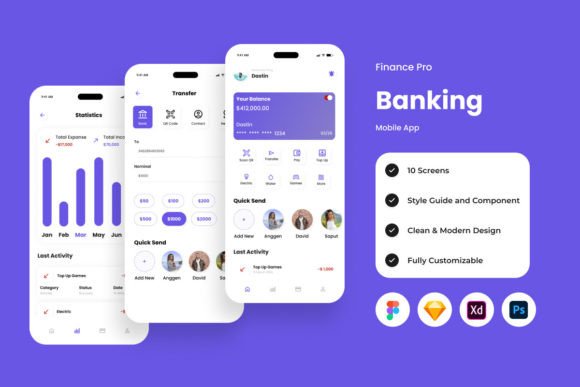
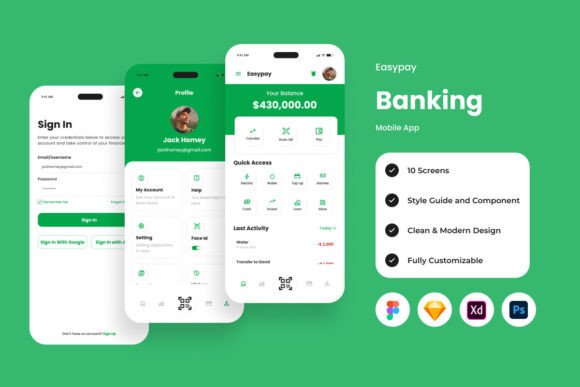
The personality of the Easypay kit is one of calm confidence. It avoids the visual noise common in financial apps, where every feature screams for attention. Instead, it uses a minimalist approach, leveraging generous white space, a harmonious color palette, and a clear sans serif font for modern typography that prioritizes readability. This isn't just an aesthetic choice; it's a strategic one. In fintech, clarity reduces user anxiety and builds trust. The visual hierarchy is immediately apparent, guiding the user's eye from primary actions like "Pay Now" to secondary details without confusion.
The overall appeal lies in its balance. It feels professional and secure enough for serious banking, yet friendly and approachable for everyday tasks. This duality makes the Easypay - Banking Mobile App asset incredibly versatile. It can support a brand identity for a new neobank targeting millennials or serve as the foundation for a corporate expense management tool. The high-quality screen layout design ensures that every component, from the dashboard graph to the transaction list, feels cohesive and polished.
Where This UI Kit Truly Shines: Practical Applications
Understanding the strengths of a design asset like Easypay means looking beyond the mockups. Its real value is in how it solves real-world design challenges across different domains.
For Digital Product Designers & Developers
This is your head start. Instead of spending weeks building a component library from scratch, you have a well-organized, adjustable system. The layers are meticulously named and grouped, making it easy to customize colors, swap out icons, or restructure layouts in Figma, Sketch, Adobe XD, or Photoshop. The inclusion of global text and color styles is a massive time-saver, ensuring consistency across hundreds of screens. You can prototype a fully interactive banking flow in a fraction of the time.
For Entrepreneurs & Startups
If you're building a fintech product, your pitch deck and MVP need to look credible. Using the Easypay kit allows you to present a high-fidelity, interactive prototype to investors and early users. It communicates professionalism and a deep understanding of user experience. The clean UI can directly influence your product's perceived quality, helping to shape a positive brand perception from day one.
For Marketers & Content Creators
The applications extend beyond app design. The screens and components can be repurposed for compelling social media graphics, explainer video assets, or website hero sections for a financial service blog. The aesthetic is perfect for creating content that feels modern and trustworthy. Imagine using a stylized transaction screen in an Instagram story promoting a new savings feature—the visual language instantly communicates the app's functionality and style.
Making Easypay Work for You: A Practical Guide
Adopting a new design system requires a strategic approach. Here’s how to evaluate and implement the Easypay - Banking Mobile App kit effectively.
Evaluate the Fit: Before diving in, map the kit's screens to your project's user flow. Does it cover the core journeys: onboarding, account overview, payments, and settings? The strength of a UI kit is in its comprehensiveness for a specific domain. Easypay is built for finance, so it will have the nuanced components you need, like secure input fields and data visualization charts.
Test Font Pairings: While the kit uses open-source fonts, you may want to align it with your existing brand identity. The clean sans serif base is a fantastic canvas. Try pairing it with a contrasting serif font for headings in marketing materials to add a touch of authority, or a subtle script font for a friendly, human touch in microcopy. The goal is to maintain the core readability while adding your unique flavor.
Leverage the Flexibility: The fact that it's easy to adjust is its superpower. Don't just use it as-is. Use the well-organized layers to create variations. Develop a dark mode theme. Adapt the color palette to match your client's brand guidelines. The structure is there to support your creativity, not constrain it.
Mind the Licensing: The kit includes files for major design platforms, but always double-check the license for commercial use, especially if you're building a product for sale. The assets are included for preview purposes, so ensure you have the proper rights for any final implementation. This is a crucial step in maintaining professionalism and avoiding legal pitfalls.
In the end, a resource like the Easypay - Banking Mobile App UI Kit is more than just a collection of screens. It's a catalyst for creating better financial experiences. It provides the polished, user-tested foundation so you can focus on the unique features, content, and strategy that will make your product stand out. It turns the complex task of designing for finance into a smoother, more magical process.